
How to Send a Fax Without a Fax Machine: A Quick Guide
Table of Contents
In today's digital world, you no longer need a bulky, dust-collecting machine in the corner of your office to send a fax. The easiest and most efficient way to send a fax without a fax machine is by using a modern online fax service. These platforms allow you to upload a document directly from your computer, smartphone, or cloud storage, enter the recipient's fax number, and transmit it securely over the internet. The entire process is designed to be quick and intuitive, often taking just a few minutes from start to finish.
Ready To Fax?
Start sending faxes online in seconds with FaxZen - No account required
Send Fax Now 🚀Ready to ditch the old hardware? Send your first fax online in minutes with FaxZen.
Why Online Faxing is the Modern Standard
The days of listening to piercing screeches, wrestling with frustrating paper jams, and paying for a dedicated phone line are thankfully behind us. Sending a fax without a physical machine has become the go-to method for businesses and individuals who need a reliable and secure way to transmit important documents. This isn't just a minor trend; it represents a fundamental shift in how we approach secure communication, moving from cumbersome hardware to flexible, software-based solutions.
The convenience and cost-effectiveness of this approach have fueled significant growth in the market. It proves that while the need for the security and legal standing of faxing remains strong, the technology has finally evolved to meet the demands of a modern, mobile workforce.
The core issue with traditional faxing was never the concept itself—it was the clunky, outdated hardware. Online services solve this by separating the secure transmission protocol from the physical machine, giving you the power to send a fax from anywhere with an internet connection. This digital transformation offers immediate, practical advantages that fit perfectly with how we work today. It’s not just about convenience; it's a much smarter and more secure way to handle important communications. For anyone who just needs to send a single fax online quickly, the benefits are crystal clear.
First, the cost savings are significant. With pay-per-fax services, you only pay for what you actually send, eliminating recurring subscription fees and the overhead costs of paper, toner, and maintenance. Another huge win is security. Reputable digital fax services use robust encryption to shield your documents while they're in transit. This provides a level of confidentiality that a physical machine in a shared office space simply cannot guarantee.
Choosing the Right Method to Fax Online
Once you've decided to move beyond the old fax machine, you'll find a few different ways to send a fax online. The best one for you depends entirely on your specific needs, particularly how frequently you need to send documents. The main choices are pay-per-fax services, monthly subscription plans, and dedicated mobile apps, each designed for a different type of user. This decision is the most critical step in ensuring you have an efficient and cost-effective experience.
This flowchart can help guide your decision on when an online service is the right move.
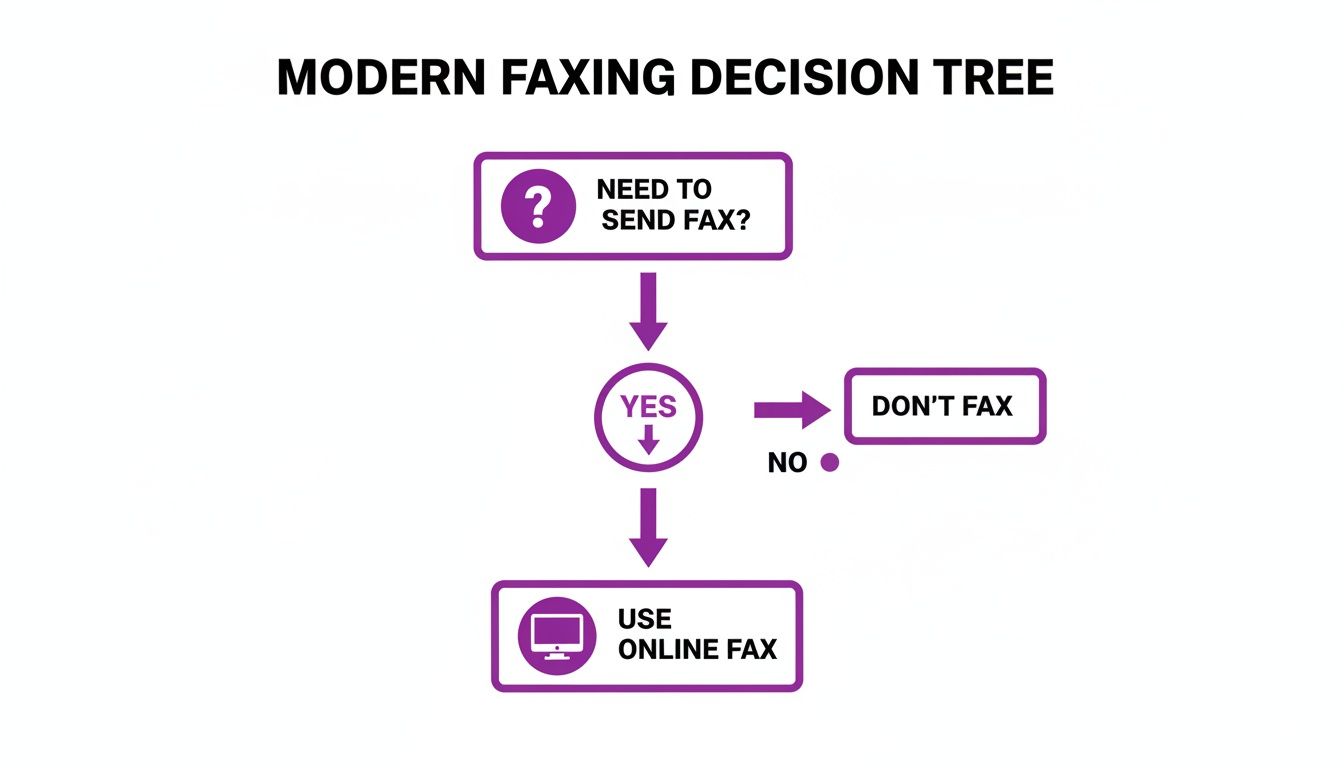
As you can see, the path for most people today leads straight to an online service, completely bypassing the need for physical hardware. It’s a clear shift from clunky machines to flexible, digital solutions that work with the tools we already use, like modern VoIP for business solutions.
The biggest fork in the road is choosing between paying as you go or signing up for a monthly plan. A pay-per-fax service is perfect for anyone who faxes infrequently—think sending a signed contract once a quarter or submitting tax documents once a year. You pay a small, one-time fee only when you need it. On the other hand, a monthly subscription is the smarter play for businesses with steady faxing needs. If you send invoices or reports weekly, a subscription offers a lower cost per page and often includes a dedicated fax number for receiving documents.
Pro Tip: The "best" method isn't about which one has the most features, but which one fits your workflow and frequency. A single, urgent fax doesn't justify a monthly subscription, just as a pay-per-fax service would get expensive for a business sending dozens of faxes each week.
To help you see the differences clearly, this table breaks down the most popular ways to fax without a machine.
| Method | Best For | Typical Cost Structure | Key Feature |
|---|---|---|---|
| Pay-Per-Fax Service | Infrequent, one-off faxes (e.g., contracts, forms) | One-time payment per fax or credit bundle | No commitment or recurring fees |
| Monthly Subscription | Businesses with regular, moderate-to-high volume | Recurring monthly or annual fee | Dedicated number for sending & receiving |
| Mobile Faxing App | Users on the move needing to scan and send | Can be pay-per-fax or subscription-based | Ability to scan documents with a phone camera |
Ultimately, picking the right way to send a fax comes down to your own needs. If you're still weighing the options, our in-depth guide on the best online faxing service can give you even more detailed comparisons.
A Step-by-Step Guide to Sending Your First Online Fax
Sending your first document online is refreshingly straightforward and feels a lot like sending an email. Modern services like FaxZen have stripped away all the old-school complexity, boiling the process down to a few simple clicks. There's no need for special training or technical know-how; if you can attach a file to an email, you can send an online fax.
First, you need to prepare your document. The good news is that most online services are built to handle the common file types you already use every day, such as PDF, DOCX, XLSX, JPG, and PNG. Simply select the file from your computer or cloud drive like Google Drive, and the platform handles the conversion behind the scenes.
Next, you will enter the recipient's details. This part is crucial: enter the full fax number, complete with the country code and area code. This is also your chance to add a professional cover page, which is highly recommended. A cover page acts as a routing slip, ensuring your document lands on the right desk in a busy office. You can typically include the recipient's name, your name, a subject line, and a short message. For those who prefer working from their inbox, many services offer this functionality. You can learn more about how to send a fax from email in our detailed guide.
Finally, you just hit send. This is where online faxing truly outshines traditional machines. Smart features work in the background to ensure your fax gets through. For example, if the recipient's line is busy, an intelligent retry feature will automatically attempt to send it again at intervals. Once your fax is delivered, you’ll receive a detailed confirmation email. This isn’t just a simple "sent" notification; it’s your verifiable proof of transmission, showing the exact delivery time, number of pages, and even a copy of the document you sent.
Ensuring Your Faxes Remain Secure and Private
When you’re sending sensitive information—contracts, financial records, or personal data—security is non-negotiable. Reputable online fax services are built from the ground up to protect your documents with a level of security that a traditional fax machine in a shared office simply cannot match. A confidential document left on an output tray is a significant privacy risk; digital faxing eliminates this vulnerability entirely.
The bedrock of secure digital faxing is encryption. When you send a fax without a fax machine, the best services use robust 256-bit SSL encryption. This is the same powerful technology that banks and e-commerce sites use to scramble data, turning your document into unreadable code while it travels over the internet. This effectively prevents unauthorized interception.
Another crucial security factor is how your documents are stored. Online fax platforms have clear data retention policies. For example, a service might automatically and permanently delete your sent documents after 24 hours. This practice minimizes risk by ensuring your sensitive files aren't stored indefinitely on a server. This digital-first approach also aligns with broader cybersecurity principles. To keep your faxes protected, it’s wise to follow network security best practices, such as using strong passwords and avoiding public Wi-Fi for sensitive transmissions. By choosing a modern online service, you’re not just finding an easier way to send a fax—you’re adopting a fundamentally more secure method for handling your most important communications.
FAQ: Answering Your Top Questions
Here are answers to some of the most frequently asked questions about how to send a fax without a fax machine.


