VPN HIPAA Compliance: What It Takes to Stay Compliant
Table of Contents
- Why VPN HIPAA Compliance Starts With a Real Remote Access Story
- What a VPN Actually Does for Healthcare Traffic
- Encryption and Protocol Choices That Hold Up
- Authentication, Access Control, and the Layer Most Teams Skip
- VPNs, TLS, ZTNA, and Secure Faxing Side by Side
- An Operational Checklist You Can Hand to IT or an Auditor
- Common Audit Pitfalls and the VPN-Only Trap
A Tuesday morning starts with a familiar shortcut. A nurse practitioner opens her laptop at a coffee shop, joins the public Wi-Fi, and connects to the clinic's EHR before her first patient arrives. The VPN may encrypt traffic between her device and the clinic, but it doesn't prove that the hotspot is trustworthy, that her laptop is patched, or that she's authorized to view every record available through the connection.
Ready To Fax?
Start sending faxes online in seconds with FaxZen - No account required
Send Fax Now 🚀If you're reviewing your remote access setup, FaxZen can also support document workflows where secure fax transmission and delivery evidence matter.
Why VPN HIPAA Compliance Starts With a Real Remote Access Story
The tunnel protects data while it travels. It can help prevent someone on the coffee shop network from reading the EHR traffic between the clinician's device and the clinic gateway. That's valuable, especially when staff, vendors, or clinicians connect over public networks.
But the workflow has more links. The clinician still types credentials into a portal, relies on the laptop's browser and operating system, and may work from a device with missing security updates. If malware has installed a keylogger, the VPN won't stop it from capturing credentials before encryption begins. If the user downloads a patient document to an unmanaged personal device, the tunnel can't control what happens afterward.
That's why vpn HIPAA compliance is a chain of decisions, not a product checkbox. The organization must decide who may connect, which devices qualify, which applications each role may reach, how sessions are recorded, and how staff respond when something changes.
Practical rule: Treat every remote connection as a workflow that needs ownership, evidence, and review.
Administrative safeguards shape the policy and training. Physical safeguards address the device and workspace. Technical safeguards include encryption, authentication, access controls, and audit controls. Healthcare teams looking beyond the connection itself can use Ciphar's data protection guidance as additional context, while remote worker best practices can help translate policy into everyday behavior.
What a VPN Actually Does for Healthcare Traffic
Think of a VPN as a locked courier pouch. A clinician's device places network traffic inside the pouch, and the organization's gateway opens it at the other end. People on the public internet may see that a connection exists, but strong encryption is intended to prevent them from reading or altering the contents.
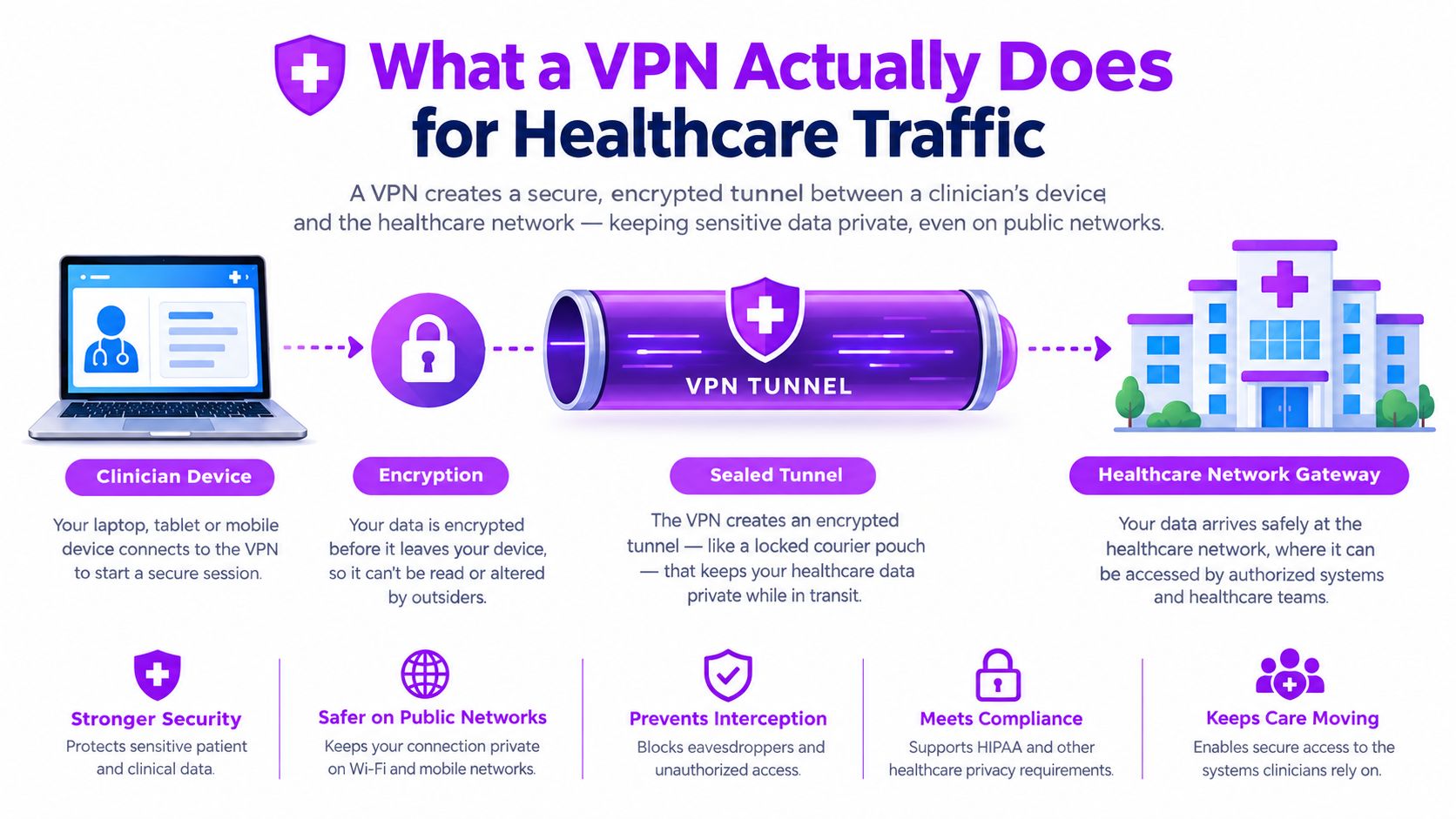
Under the Security Rule, encryption of electronic protected health information is an addressable implementation specification. The organization must assess whether encryption is reasonable and appropriate, then document implementation or an equivalent safeguard. The rule's administrative, physical, and technical structure means the VPN covers only part of the responsibility. HHS describes VPNs as encrypted remote-access connections and recommends strong protocols such as TLS for remote access in its remote access security alert.
The tunnel doesn't replace identity controls, device management, or monitoring. It also won't stop a stolen session cookie, a compromised endpoint, or an authorized employee from accessing more information than their role requires.
For teams evaluating client behavior and deployment options, a smart VPN client guide offers useful implementation context. A separate secure file transfer service may be more suitable when the workflow is moving documents rather than providing broad network access.
Encryption and Protocol Choices That Hold Up
A small clinic usually chooses among a few practical protocol families. WireGuard suits new deployments that need a modern, lightweight tunnel. IKEv2/IPsec remains useful for site-to-site connections and compatibility with established network equipment. OpenVPN with TLS can help where firewall traversal and broad client support matter.
For healthcare traffic, guidance commonly converges on AES-256-class encryption, TLS 1.2 or 1.3, IKEv2/IPsec, Perfect Forward Secrecy, and integrity protection such as HMAC-SHA-2. The healthcare VPN configuration guide explains why confidentiality alone isn't enough. The tunnel must also detect tampering.
| Protocol | Encryption | Audit readiness | Typical use |
|---|---|---|---|
| WireGuard | Modern authenticated encryption, configured with approved cryptographic controls | Strong when centrally managed and logged | New remote-access deployments |
| IKEv2/IPsec | IPsec encryption with authenticated key exchange | Strong for documented site-to-site and managed client access | Legacy compatibility and network links |
| OpenVPN | TLS-based encryption, preferably with modern cipher suites | Strong when configuration and logs are controlled | Firewall traversal and broad client support |
| PPTP | Obsolete protection | Not suitable for a defensible configuration | Avoid |
| L2TP without IPsec | No encryption layer by itself | Not suitable for protected traffic | Avoid |
AES-256-GCM combines encryption with integrity checking. AES-256-CBC can still appear in older configurations, but it needs a separate integrity mechanism and careful implementation. Enable Perfect Forward Secrecy through ephemeral key exchange where supported, and prefer FIPS-validated cryptographic modules when available. The plain-language guide to 256-bit SSL encryption can help nontechnical administrators understand the terminology.
A reviewer will usually inspect the actual configuration, not the vendor's marketing label. That means checking cipher suites, protocol versions, certificate handling, MFA integration, administrative changes, and connection logs. If an EHR uses a web interface behind the tunnel, require modern TLS, with TLS 1.3 preferred where supported and TLS 1.2 maintained where compatibility requires it.
Authentication, Access Control, and the Layer Most Teams Skip
Encryption answers, “Can outsiders read the traffic?” Authentication and authorization answer two different questions, “Who is connecting?” and “What may that person reach?”
Start with unique user IDs. Shared accounts hide responsibility and make an audit trail difficult to defend. Add MFA through group policy, rather than leaving it as an optional user setting. Then control the session itself with idle timeouts, automatic logoff, and re-authentication when the network or device context changes.
Authorization should follow the job. A billing clerk may need claims systems but not clinical charts. A nurse may need patient records but not broad billing exports. A contractor might need one application for a defined task, not a route into the entire internal network.
Make the device part of the decision
A valid password from an unsafe device is still a risk. Require managed endpoints, current operating-system patches, disk encryption, and MDM verification before allowing access. Add context checks for location, time of day, concurrent sessions, and unusual behavior. A sudden change can trigger step-up authentication or a block.
The enterprise data security guide provides broader context for connecting identity, devices, and access policy.
Access principle: A VPN should open only the doors a person needs, from a device the organization can trust, for as long as the task requires.
Document why each control exists. That explanation matters when a clinic chooses an exception, supports a legacy application, or allows a vendor to connect after hours.
VPNs, TLS, ZTNA, and Secure Faxing Side by Side
A VPN isn't synonymous with remote access. A traditional client VPN may create a broad connection to the clinic network, even when a clinician needs only one browser-based EHR application. A TLS-secured web application can provide a narrower path, provided the application has strong identity, session, and authorization controls.
Zero Trust Network Access, or ZTNA, goes further by brokering access per application after checking identity, device posture, and context. It removes the need to place the user directly on the internal network. VPNs still have a role for legacy systems, administrative workstations, and workloads that genuinely require network-level connectivity.
Secure faxing serves a different purpose. When referrals, legal records, pharmacy documents, or insurance forms must leave the electronic system, a secure fax workflow can keep those documents within a controlled transmission and delivery process. See this overview of electronic faxing for healthcare workflows for a related comparison.
| Approach | Best fit | Encryption basis | Access granularity | Common trade-off |
|---|---|---|---|---|
| Client VPN | Legacy systems and admin workstations | Encrypted tunnel | Network or segment based | Broader reach requires careful segmentation |
| TLS web app | SaaS EHR and browser workflows | TLS session encryption | Application based | Depends heavily on application controls |
| ZTNA | Modern per-application access | Encrypted brokered connection | Fine grained | Requires planning and compatible infrastructure |
| Secure fax | External clinical and business documents | Provider-controlled secure transmission | Document workflow | Doesn't replace application access controls |
The defensible pattern is to match the tool to the workload, record the decision, and revisit it when systems or vendors change.
An Operational Checklist You Can Hand to IT or an Auditor
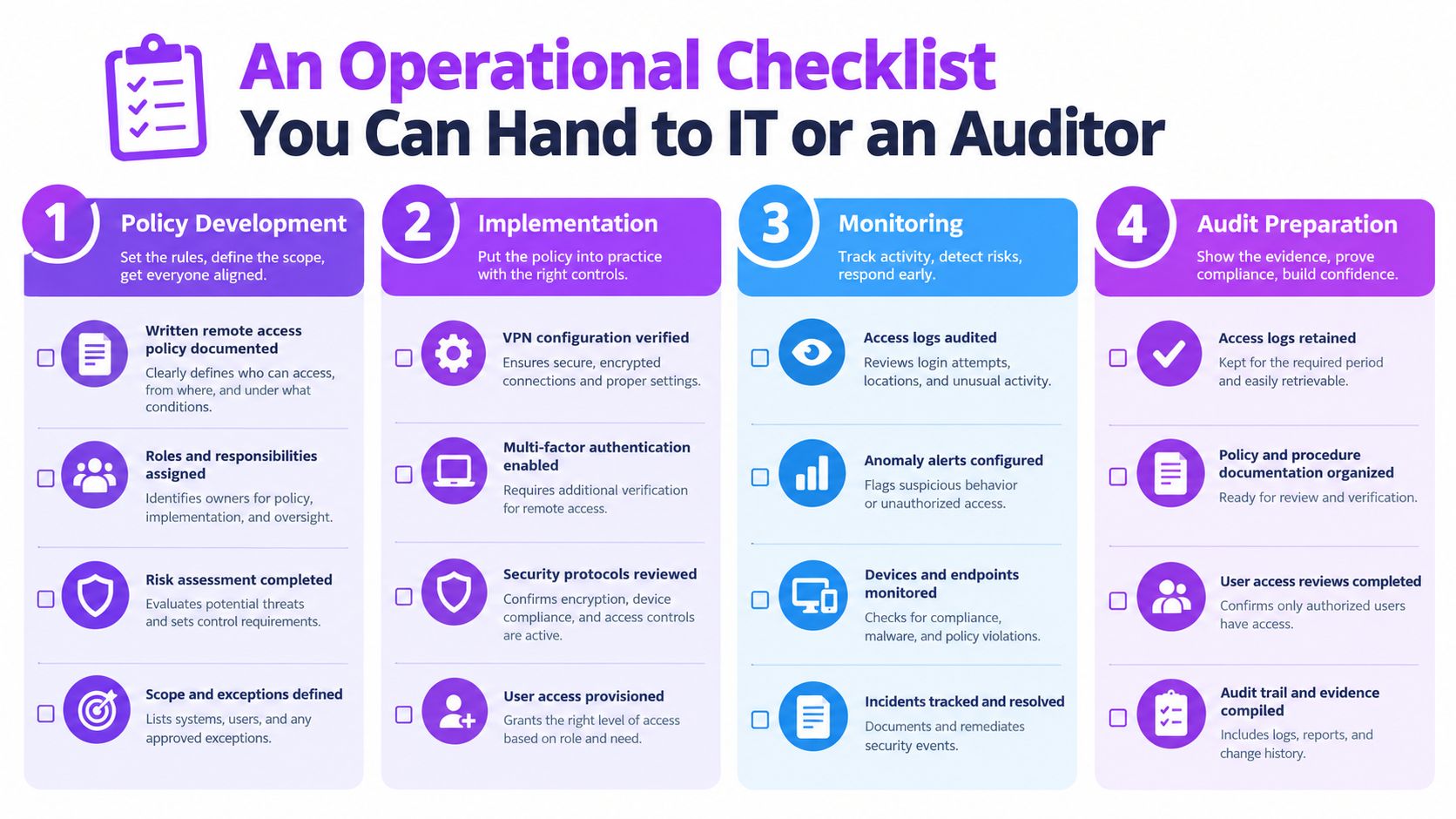
A configuration screenshot won't explain who approved access, why split tunneling exists, or whether the vendor may handle ePHI. Build evidence across the full lifecycle.
Policy and design
- Written policy: Define approved remote connections, prohibited workarounds, and staff responsibilities.
- Network map: Show VPN concentrators, application paths, and any ZTNA brokers.
- Vendor agreements: Keep signed BAAs with vendors that touch ePHI.
- Risk assessment: Tie each remote entry point to a documented risk decision.
Identity and devices
Use unique IDs, enforced MFA, group-based least privilege, and a joiner-mover-leaver process with prompt deprovisioning. Maintain a managed-device inventory and verify MDM enrollment before connection. Require disk encryption and current patches.
Split tunneling deserves a written decision. Full tunneling is easier to reason about for ePHI sessions because traffic follows the organization's controls. If split tunneling is necessary, scope it tightly, justify it, and add DNS leak protection. Recent remote-access guidance also places device posture, centralized monitoring, and ZTNA-style controls alongside VPN encryption, rather than treating the VPN as sufficient by itself. See guidance on protecting AI medical device data for a related view of layered healthcare security.
Logging and response
Centralize authentication, tunnel events, policy decisions, accessed records, IP addresses, timestamps, and administrator changes in a SIEM. Time-sync the sources, restrict log access, and document retention according to applicable record-retention requirements. Recent guidance discusses preserving documentation for up to six years under HIPAA record-retention expectations, as outlined by remote access logging guidance.
Name incident owners, test restoration, review the policy annually, and walk this checklist line by line before an audit window opens.
Common Audit Pitfalls and the VPN-Only Trap
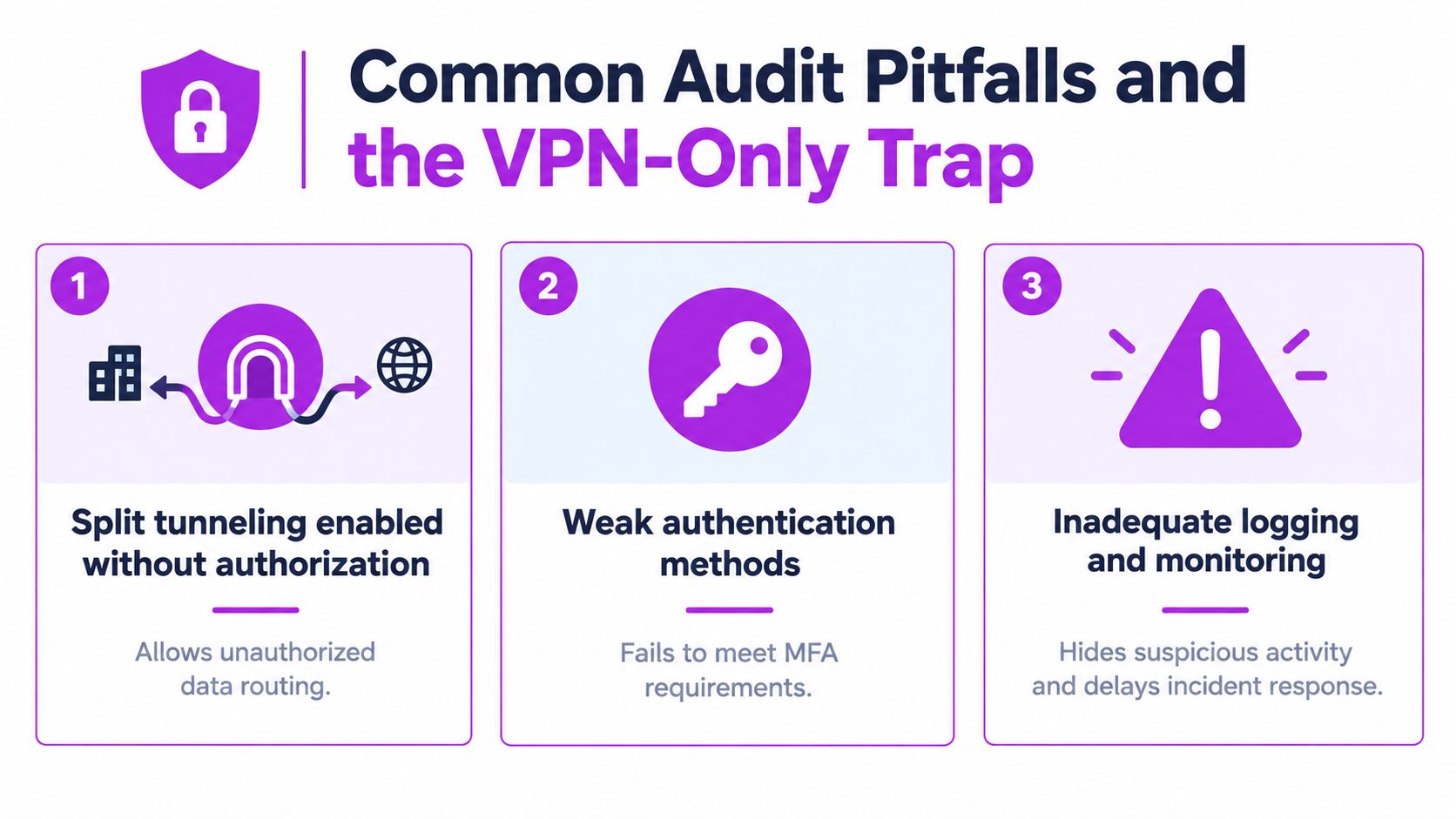
A working tunnel can coexist with weak governance. One recurring failure is split tunneling enabled without a documented business reason. Another is logging that exists technically but nobody reviews. Logs become useful evidence only when the organization can explain what it monitors, who reviews it, and how it responds.
Provider governance creates another gap. The HHS resolution involving Virtual Private Network Solutions, LLC concerned a breach notice filed on December 30, 2021 covering 12 covered entities that had delegated breach reporting to the provider. Ransomware on the provider's server encrypted covered-entity data. The case shows why a connectivity vendor can become a shared risk point, and why contracts, incident procedures, and vendor review belong in the remote-access program. HHS also explains that properly encrypted PHI can qualify for safe harbor under the Breach Notification Rule when attackers obtain only ciphertext. Read the HHS resolution involving Virtual Private Network Solutions for the enforcement context.
What reviewers will question
- Shared accounts: If several people use one identity, the clinic can't reliably show who viewed a record.
- Broad firewall rules: Stale rules may expose entire subnets when the role requires one application.
- Unreviewed access: Stale contractor accounts and unchanged group memberships weaken least privilege.
- Configuration drift: Cipher suites, protocol versions, and routing settings can change without policy records.
- Missing vendor paperwork: An unsigned BAA leaves a material governance gap where a vendor handles ePHI.
Continuous verification is more realistic than a one-time installation. Schedule access reviews, test the VPN concentrator, detect configuration drift, and run tabletop exercises for a suspicious session. A defensible program can reconstruct what happened months later, even after staff, devices, providers, and configurations have changed.
The audit question isn't “Do you have a VPN?” It's “Can you prove that the right person, on the right device, reached only the right system, and that someone reviewed the evidence?”
Related articles
FAQ
Is a VPN alone enough for healthcare remote access?
No. A VPN protects traffic in transit, but the broader control set includes unique user IDs, MFA, least-privilege authorization, managed devices, session controls, logging, and documented risk analysis.
Should a clinic disable split tunneling?
Not automatically. The clinic should assess the workflow. Full tunneling is easier to control for ePHI sessions, while split tunneling may be acceptable when tightly scoped, justified, and supported by controls such as device checks and DNS leak protection.
What should VPN logs contain?
Capture user identity, source IP, timestamps, accessed records or systems, policy decisions, and administrator changes. Centralize the records in a SIEM and define retention based on applicable requirements.
Does HIPAA require a specific VPN product?
No. The organization must assess whether its encryption, access controls, auditability, and related safeguards are reasonable and appropriate for its environment.
What should a clinic ask a VPN vendor?
Ask about encryption protocols, MFA enforcement, logging, administrative access, incident notification, infrastructure controls, and whether the vendor will sign a BAA when applicable.
FaxZen supports secure online faxing for sending healthcare and business documents without a fax machine, with encrypted transmission, delivery status, email confirmation, and automatic document deletion after 24 hours. Visit FaxZen to send a document securely and keep clear delivery evidence for the workflow.