
How to Send Faxes Online Without a Fax Machine
Table of Contents
- Why Faxing Still Has a Place in Your Digital Toolkit
- Choosing the Right Method to Send Your Fax Online
- Preparing Your Documents for Flawless Delivery
- Finding the Right Online Fax Service for You
- Confirming Delivery and Troubleshooting Common Issues
- Online Faxing in the Real World
- Frequently Asked Questions About Online Faxing
- Related Articles
Sending a fax online is surprisingly simple—think attaching a document to an email. You just use a web service to upload your file, pop in the recipient's fax number, and hit send. That’s it. Your computer or phone instantly becomes a secure, modern faxing device, ditching the clunky old machine for good.
Ready To Fax?
Start sending faxes online in seconds with FaxZen - No account required
Send Fax Now 🚀Ready to ditch the old machine? Discover the easiest way to send secure faxes with FaxZen.
Why Faxing Still Has a Place in Your Digital Toolkit
It feels like a technology from another era, but faxing is still incredibly relevant. For industries like law, healthcare, and finance, a fax transmission carries a unique legal weight that email just doesn't have. Unlike an email that can be intercepted or altered, a fax creates a direct, point-to-point connection that's much tougher to compromise. This is the established reliability that government agencies and medical offices still count on for sending sensitive documents. But this doesn't mean you're stuck with paper jams, busy signals, and pricey ink cartridges. Those days are over.
Online fax services are the perfect bridge between trusted technology and a modern workflow. You get the security and legal standing of a traditional fax, but with the ease of sending a file from your desktop or phone. Signed contracts, medical forms, legal filings—it all just works. This evolution is a huge part of the modern workplace. Moving to a digital workflow is much smoother when you implement solid paperless office solutions, and online faxing is a key piece of that puzzle. It lets businesses stay compliant and secure without slowing down.
Key Takeaway: The real game-changer with online faxing is the verifiable transmission receipt. This confirmation report is your proof of delivery—something standard email can't provide, making it essential for any official correspondence.
Beyond security, the practical benefits are massive. There’s no hardware to maintain, no dedicated phone line to pay for, and zero wasted paper. You can send documents to any fax number on the planet, see their delivery status in real-time, and get a confirmation email the second it arrives. This modern approach isn't just a replacement for an old machine; it's a smarter, more efficient way to handle your important documents. For a deeper look, check out the 10 Benefits of Online Fax Services for Business.
Choosing the Right Method to Send Your Fax Online
When it comes to sending a fax online, you've got a few great options. The best choice really boils down to where you are, what kind of document you're sending, and what feels most natural for your workflow. The most direct route for most people is using a web portal. This is perfect when you have a digital file—like a PDF, Word doc, or scanned image—saved and ready to go. You just pop over to an online fax service's website, upload your file, punch in the recipient's fax number, and hit send. It’s about as simple as attaching a file to an email. This is the go-to when you're sending things like signed contracts, official forms, or invoices that are already sitting on your desktop.
If you live in your email inbox, the email-to-fax feature is a total game-changer. It effectively turns your favorite email client, whether it's Gmail or Outlook, into a powerful faxing tool. The whole process is surprisingly simple: compose a new email, attach your document, and send it to a special address, usually formatted like [faxnumber]@faxservice.com. You can fire off a fax from your phone, tablet, or any computer with email access without ever having to log into a separate platform. It’s the best way to bake faxing right into your daily communication habits.
For those times when you're out and about and need to send a physical piece of paper, a good mobile app becomes your best friend. These apps use your phone's camera to scan paper documents, automatically converting them into clean, fax-ready digital files. You can snap a picture of a form, sign it with your finger, and send it on its way in under a minute. A solid mobile app essentially turns your smartphone into a pocket scanner and fax machine, all in one.
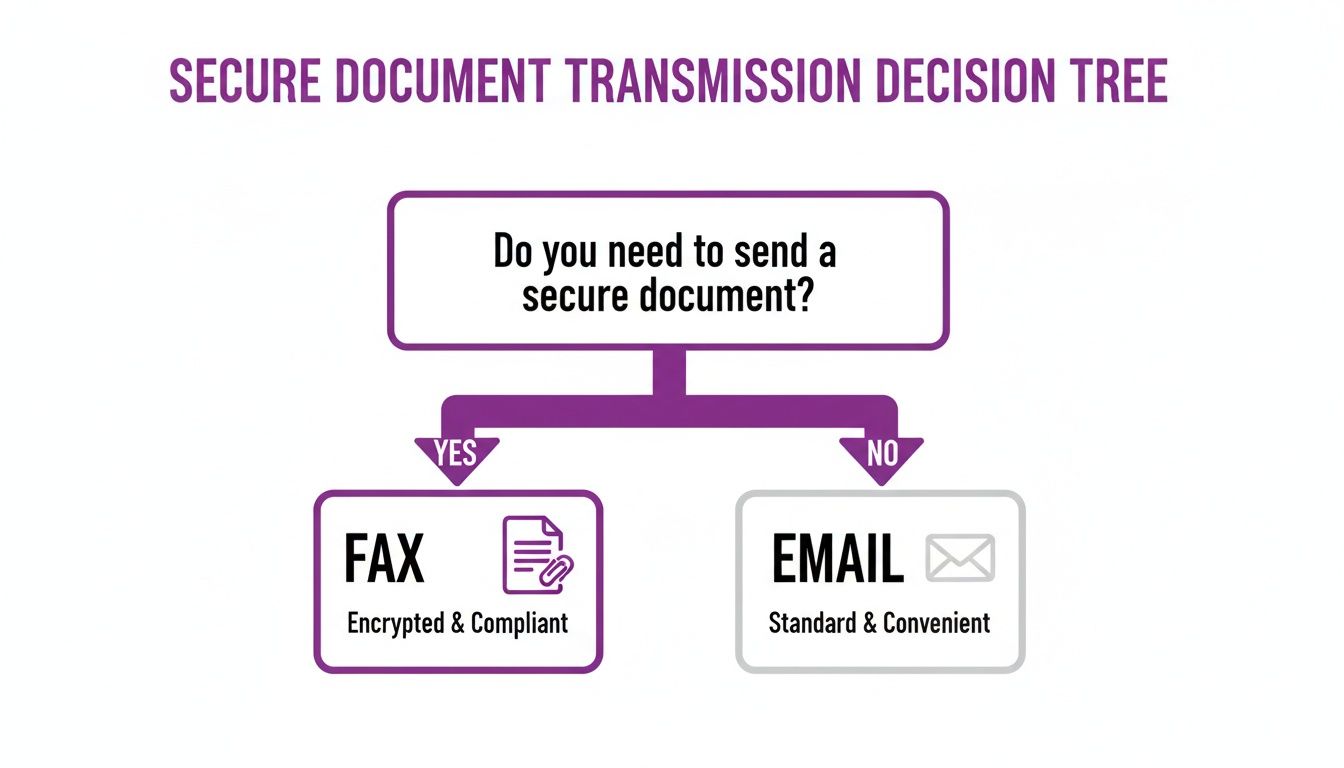
The shift towards these flexible solutions is undeniable. The global online fax market is expected to rocket to USD 7.22 billion by 2035, a trend supercharged by the rise of remote work and the persistent security needs of industries like healthcare and law. With North America alone making up 38% of the market, it’s clear this isn't just a niche tool—it's a mainstream business essential. You can learn more about the online fax market growth.
Preparing Your Documents for Flawless Delivery
A successful fax isn't just about clicking "send." It starts with the document itself. Getting this part right is the single biggest thing you can do to make sure your message arrives looking crisp, professional, and perfectly clear. The first, and easiest, win is choosing the right file format. While most online fax services can handle a bunch of file types like JPGs and Word docs, the undisputed champion is the Portable Document Format (PDF). A PDF locks in your formatting, fonts, and images, guaranteeing that what you send is exactly what your recipient sees on their end.
Once you have your PDF, a quick quality check for readability is crucial. Remember, a fax machine is essentially a black-and-white scanner. Stick with simple, classic fonts like Arial or Times New Roman and use black text on a clean white background for high contrast. Gray text or light colors can disappear completely. Also, be sure to leave generous margins to prevent text from being cut off. When your documents contain sensitive data, proper prep goes beyond formatting. It's smart to brush up on best practices for handling confidential information to ensure you're sending a secure document.
Finally, don't skip the cover sheet. It’s the first thing your recipient sees and sets a professional tone. It provides essential context, identifies the sender and recipient, and confirms the total number of pages, preventing misunderstandings about incomplete transmissions. The good news is you don't have to create one from scratch. Most quality online fax services can generate one for you automatically. If you'd rather use your own, grabbing a good fax cover sheet template in PDF is a great way to get started. Taking these few extra moments makes a huge difference.
Finding the Right Online Fax Service for You
Picking an online fax service really just comes down to one thing: finding the right fit for how you actually fax. Ask yourself: Am I sending a one-off document, or am I faxing invoices every single day? Your answer is the key to finding a service that saves you money and headaches. If you only fax a handful of times a year, the pay-per-fax model is a no-brainer. You use it only when you need it and pay only for that single trip. This is perfect for tasks like sending a signed contract or submitting a medical claim. You can learn more about the benefits of pay-per-use fax services to see if it makes sense for you.
If faxing is a regular part of your business, a subscription plan is where you'll find the real savings. These plans give you a bucket of pages each month for a flat fee, dramatically lowering your cost per page. Some services, like FaxZen, offer a hybrid approach with credit packages. You can buy a bundle of fax credits at a discount, but they don't expire. It’s the best of both worlds: cost savings with pay-as-you-go flexibility.
While cost is a factor, the cheapest option isn't always the best online faxing service. Security should be at the very top of your list. You'll want a provider that uses 256-bit SSL encryption to shield your documents. Another huge security feature is the provider’s data retention policy. Services that automatically delete your files from their servers after delivery give you an extra layer of privacy. Practical features like international sending capabilities and detailed delivery confirmations are also crucial. Your confirmation is your proof of delivery.
| Model | Best For | Typical Cost Structure |
|---|---|---|
| Pay-Per-Fax | Occasional users (1-5 faxes/year) | A flat fee per fax or per page. No recurring charges. |
| Credit Packages | Sporadic but predictable users | Buy a bundle of credits upfront at a discounted rate. |
| Monthly Subscription | Regular business users | A recurring monthly fee for a set number of pages (e.g., 300 pages/month). |
The move to online platforms has made faxing incredibly affordable. You can forget about the costs of a dedicated phone line, ink, and paper. Security has also become a central focus, with an estimated 85% of online fax transmissions being encrypted and 93% of services offering detailed audit logs for tracking. You can discover more insights about the online fax market to get a feel for the industry trends.
Confirming Delivery and Troubleshooting Common Issues
Hitting "send" is just the start. The real peace of mind comes from knowing your fax actually arrived. Modern online fax services give you real-time status updates, sending a detailed confirmation report straight to your email the second the transmission is successful. This isn't just a simple "sent" notification. A proper confirmation report is your digital receipt, your proof of delivery. It will show you the recipient's fax number, the exact time of delivery, how many pages went through, and usually a little thumbnail image of the cover page. This creates a rock-solid, auditable trail for your records.
Faxes fail sometimes; it's a reality of the technology. The most common reason is a busy signal. Instead of making you hit redial, a quality service uses intelligent retry logic. This means the system automatically tries sending your fax again at smart intervals, which massively increases the odds of getting through. If the fax still can't get through after a few tries, you'll get a final failure notification. This email will usually include a specific error code or reason, which is your key to figuring out what's wrong and how to solve it.
| Error Message | Common Cause | Recommended Action |
|---|---|---|
| Busy Signal | The recipient's fax machine is currently in use or offline. | No immediate action is needed. Most services will automatically retry. If it persists, try sending at a different time. |
| No Answer | The receiving machine did not pick up the call. | Double-check that you have the correct fax number, including the country and area code. |
| Communication Error | An issue with the phone line connection caused the transmission to drop. | This is often a temporary line quality issue. Simply resend the fax. |
Knowing when to just retry versus when you need to double-check the number can save a ton of time and frustration, especially if you only need to send one fax online. It's all about managing the process with confidence, from start to finish.
Online Faxing in the Real World
Let's look at how this actually plays out in real life. Understanding the steps is one thing, but seeing online faxing solve genuine, everyday problems is where its value really clicks. For example, a small business owner needing to send a signed contract to a new international vendor can skip the old fax machine. Instead, they just use a web portal to upload the PDF, add a professional branded cover page automatically, and send it. Moments later, a confirmation email lands in their inbox—a perfect record of the delivery.
Now, consider a more personal scenario. Someone needs to submit a sensitive form to a government agency. The old way meant driving to a copy shop. With a mobile app, they can just use their phone’s camera to scan the paper right from their kitchen table. The app cleans it up, turning it into a crisp, readable file. They send it immediately and get a real-time status update right on their phone. This is how modern faxing eliminates friction from necessary tasks.
For small and medium-sized businesses (SMEs), the impact is huge. Automation can boost document turnaround by a staggering 44% and slash paper handling by 69%. It's no surprise that 68% of SMEs are opting for subscription or credit-based models to keep costs predictable. And in industries like legal and healthcare, the robust security and tracking features are the deciding factor in 81% of purchasing decisions. For a deeper dive, check out the trends in the online fax service market. These scenarios reveal a simple truth: online faxing is about ensuring security, creating a solid audit trail, and saving precious time.
Frequently Asked Questions About Online Faxing
Got questions about sending a fax online? You're not alone. Let's clear up some of the most common ones so you can send your documents with total confidence.
Is Sending a Fax Online Actually Secure?
Yes, and honestly, it’s a huge step up from the old way. A good online fax service uses tough 256-bit SSL encryption while your document is in transit. Think about it—that's way more secure than leaving a sensitive paper sitting in a public fax tray for anyone to see. Plus, services like FaxZen take it a step further by automatically deleting your files from their servers once the fax is delivered, which is a big win for privacy.
Do I Need a Phone Line or Any Special Hardware?
Nope, and that’s one of the best parts. Online faxing completely ditches the need for a physical fax machine, a dedicated phone line, and all the clunky hardware that goes with it. It all works over your internet connection. You can send faxes right from your computer, tablet, or even your phone while you're on the go.
How Do I Know My Online Fax Was Delivered?
You'll get proof. Professional online fax services send a detailed delivery confirmation right to your email. This isn't just a simple "sent" message; it's a proper receipt. It typically includes the exact date and time of delivery, the recipient's fax number, and the total page count. It's the official record you need to confirm the transmission was successful.
Can I Send a Fax to an International Number?
Absolutely. Most leading online fax providers are built for global communication. All you need to do is enter the full fax number, making sure to include the correct country and area codes. It’s a surprisingly easy and affordable way to send documents across the world without dealing with the headache of international long-distance phone charges.
What File Formats Can I Use to Send a Fax Online?
Most online fax services are very flexible and support a wide range of common file types. This typically includes PDF, Microsoft Word documents (DOC, DOCX), Excel spreadsheets (XLS, XLSX), and image files like JPG, PNG, and TIFF. However, for the best results and to ensure your document looks exactly as intended, using a PDF is always the recommended choice.


