
How to Fax Through Email: A Modern Business Guide
Table of Contents
Faxing isn't dead; it’s just gone digital. The ability to fax through email connects the battle-tested reliability of traditional faxing with the sheer convenience of your inbox. This modern approach means you can send secure, legally-binding documents directly from your email client without ever touching a clunky office machine or worrying about paper jams. It’s a seamless integration into the workflow you already use every day.
Ready To Fax?
Start sending faxes online in seconds with FaxZen - No account required
Send Fax Now 🚀Ready to see how simple it is? Give FaxZen a try and see what the future of faxing looks like.
Why Faxing Through Email Is the New Standard
The era of bulky fax machines, frustrating paper jams, and the dreaded busy signal is officially over. Faxing through email has stepped up as the modern way to transmit documents, mixing rock-solid security with an efficiency that old hardware just can't match. This isn't just about replacing outdated tech; it's a smart upgrade for professionals in any industry. By integrating faxing directly into your email workflow, you eliminate unnecessary steps and centralize your communications. This shift is a key part of how automation can ease your business workload and free up your team for more important tasks.
The practical reasons for this move are compelling. As long as you have an internet connection, you can send or receive faxes from your computer, tablet, or phone, offering unparalleled flexibility for remote work. Financially, the benefits are clear as you eliminate costs for paper, ink, toner, and machine maintenance. Security is another major advantage; reputable digital fax services use powerful encryption to protect your data in transit, creating a secure pipeline for sensitive information. This digital transformation is reflected in market trends, with the global online fax service market expected to grow significantly, signaling a permanent shift in business communication.
When you ditch the physical hardware, you're doing more than just modernizing. You're adopting a more resilient and flexible way to handle your most important documents. It's a perfect fit for today's world of remote work and digital-first operations.
For fields like law, healthcare, and finance—where document security and proof of delivery are absolute must-haves—this method creates a reliable and auditable paper trail without the actual paper. Exploring cloud fax solutions offers deeper insight into how this technology is reshaping professional workflows. Ultimately, faxing through email is the logical next step for anyone who needs to exchange documents securely and efficiently.
Choosing the Right Way to Fax From Email
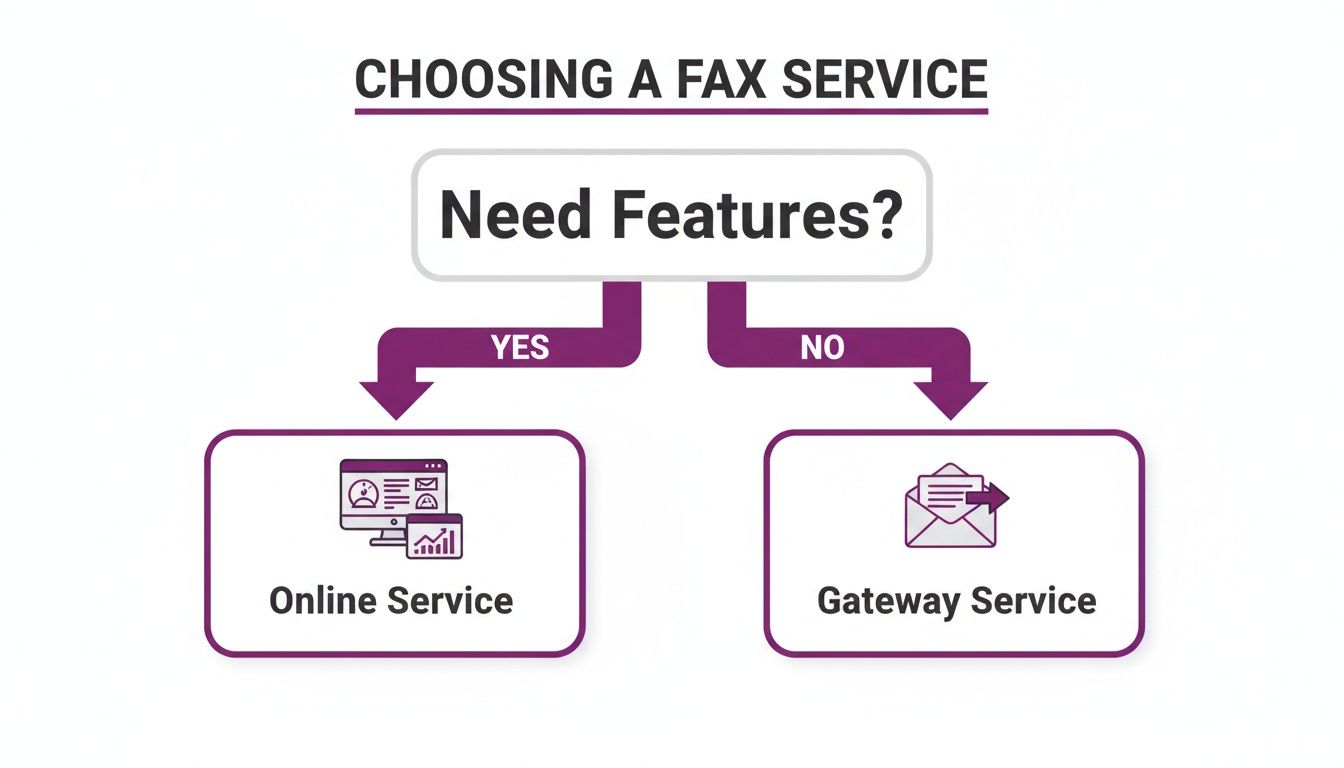
When you decide to fax through email, you’ll quickly find there are two main paths: dedicated online fax services and direct email-to-fax gateways. While both achieve the same goal, the experience is vastly different. Picking the right one depends on your needs, balancing a desire for simplicity and rich features against a more hands-on, technical setup. A dedicated service like FaxZen is designed to be user-friendly from the start, providing a clean web dashboard to manage faxes, track their status in real-time, and utilize professional features.
An email-to-fax gateway, in contrast, is a more stripped-down solution. It often requires more technical knowledge, such as specific email formatting or domain whitelisting. This option lacks the intuitive interface and value-added features that dedicated services provide, making it suitable for a narrower range of users. Understanding this distinction is crucial for ensuring your faxing process is both painless and professional.
To make the choice clearer, let's compare these two methods. The best fit usually comes down to a trade-off between user-friendliness and specific technical requirements. For most individuals and businesses, a service that works seamlessly without technical headaches is the smarter long-term choice.
| Feature | Online Fax Service (e.g., FaxZen) | Direct Email-to-Fax Gateway |
|---|---|---|
| Setup Process | Simple web-based signup, no technical skill needed | Often requires specific email formatting and domain whitelisting |
| User Experience | Intuitive dashboard, real-time status tracking, visual confirmation | Relies solely on email client; less visual feedback |
| Advanced Features | Branded cover pages, scheduling, intelligent retries | Basic functionality, typically no advanced features |
| Security | Strong encryption and secure account management | Security depends on the gateway provider's standards |
| Ideal User | Individuals, SMBs, professionals needing reliability and ease of use | IT-savvy users or businesses with specific integration needs |
For most users—from freelancers to small business owners—a dedicated online fax service is the clear winner. The setup is quick, and sending a fax becomes as straightforward as sending a standard email. You gain access to professional features like branded cover pages and intelligent retries, which automatically resend a fax if the line is busy. This peace of mind is invaluable. A direct gateway might suit a company with an IT department needing custom integration, but it sacrifices the user-friendly experience most people prefer. To see how different providers stack up, you can review a detailed online fax services comparison.
Sending Your First Fax From Your Inbox
Let's walk through the process of sending a fax using your email. Imagine a freelancer needing to submit a new client contract. The entire process feels almost identical to sending a regular email, with a few crucial differences. If you know how to send an email, you’re already 90% of the way there. You simply open your preferred email client—Gmail, Outlook, or Apple Mail—and compose a new message.
The magic happens in the 'To' field. Instead of a standard email address, you'll enter the recipient's fax number followed by the fax service's unique domain. For example, to send a contract to the fax number 1-800-555-0199 using FaxZen, you’d address the email to [email protected]. This special address acts as a bridge, telling the service to convert your email into a fax and dial the number.
What you write in your email's subject line and body automatically becomes the fax's cover page. This is a fantastic way to add a professional touch. For our freelancer, the subject could be "Signed Contract - Project Agreement," and the body could include a brief note like, "Please find the signed agreement attached. Looking forward to getting started!" The final step is to attach your document, just as you would with any other email. Once your file is attached, hit "Send." The service handles the rest, delivering your document and sending a confirmation receipt back to your inbox. You can learn more about the specifics of sending faxes from your Gmail account.
Professional and Secure Faxing Practices
Just because you can fax through email in a few clicks doesn't mean you should be casual about it. The subject and body of your email automatically become the cover page, so it's your first impression. Use a direct and descriptive subject line, such as "Invoice #1045," and keep the body brief and professional, including your contact information and the total page count. This ensures your fax gets to the right person promptly.
Before sending, double-check your attached document for clarity. A blurry or poorly formatted file looks unprofessional. Converting your document to a PDF is the best way to lock in formatting and ensure it looks exactly as intended. Security is also paramount. Reputable services like FaxZen use strong 256-bit SSL encryption, creating a secure tunnel for your documents to travel from your inbox to the destination fax machine.
One of the greatest advantages of online faxing is the robust audit trail it creates. Moments after sending, you receive a detailed delivery confirmation in your email. This digital receipt serves as official proof of transmission, containing the date, time, recipient's number, and delivery status. This verifiable record is crucial for legal contracts or any situation requiring indisputable proof of delivery. This reliability is a key reason why fax usage remains strong in many industries. You can discover more insights about the online fax market to understand its continued relevance.
What to Do When Your Fax Gets Stuck
Even with modern technology, occasional issues can arise when you fax through email. Knowing how to troubleshoot common problems can save you time and frustration. The most frequent issue is a failed transmission. Before panicking, check the basics: Did you type the fax number correctly? A single wrong digit is the most common culprit. Also, ensure your attached file is a supported format, like a PDF or JPG.
When a fax fails, your service will send a notification email explaining the reason, such as a busy signal or an invalid number. If the line was busy, a quality service will automatically retry sending it. If you made a typo, simply correct the number and resend. These confirmation and failure receipts are your best diagnostic tools.
Another potential problem is poor document quality on the recipient's end. This almost always stems from the original file. A low-resolution image or a poorly scanned document will not improve upon transmission. Always start with a high-quality source file and convert it to a PDF to preserve its integrity. For more tips, check our guide on how to fax a document from a computer. If you don't receive a confirmation email, check your spam folder first. If it's not there, log in to your fax service's web dashboard to see the real-time status of your fax.
Frequently Asked Questions
Can I receive faxes in my email inbox?
Yes, absolutely. This is one of the biggest benefits of online faxing. Your service provides a dedicated virtual fax number. When someone sends a fax to that number, it is converted into a PDF and delivered directly to your email as an attachment, streamlining your workflow.
What file formats can I use for faxing?
Online fax services are flexible and support a wide range of common file types, including PDF (.pdf), Microsoft Word (.doc, .docx), and image files like JPEG (.jpg) and PNG (.png). For the most reliable results, it's always recommended to convert your document to a PDF before attaching it to prevent formatting issues.
Is faxing through email legally binding?
Yes, faxes sent through reputable online services are generally considered legally binding. The digital confirmation receipt you receive acts as a verifiable proof of transmission, detailing the exact date, time, and delivery status. This digital trail is often more robust and easier to audit than a traditional fax machine's confirmation slip.
Do I need a physical fax machine?
No, you do not need a physical fax machine. Online fax services handle the entire transmission process digitally. You send and receive faxes through your email client or the service's web portal, completely eliminating the need for hardware, phone lines, paper, or ink.
How do I get a fax number?
When you sign up for an online fax service like FaxZen, you can choose a new fax number (local or toll-free) or, in many cases, port your existing fax number over to the new service. This number is then linked to your email account for sending and receiving faxes.


