
A Practical Guide to Secure Online Faxing
Table of Contents
In an era of instant messaging and email, you might think the fax machine is a relic. But in industries that handle sensitive information, it remains a cornerstone of secure communication. Sending protected data requires a level of security that your standard digital tools just can't provide. For any professional practice, finding a way to communicate that's both efficient and locked down isn't just a priority—it's a necessity.
Ready To Fax?
Start sending faxes online in seconds with FaxZen - No account required
Send Fax Now 🚀Ready to secure your practice's communications? See how FaxZen provides a reliable and secure online faxing solution built for modern business. Explore our features at faxzen.com today.
Why Secure Faxing Still Matters
In a complex business environment, how you share information is just as important as the information itself. While email is perfect for a quick note, it often falls short when handling sensitive client data. Most standard email services lack the end-to-end encryption needed to shield information as it travels across the internet, leaving it wide open to interception. This is where faxing, especially when updated for the digital age through online faxing services, proves its lasting value.
Standard digital tools like email can be compared to sending a postcard; anyone who handles it on its journey can read its contents. Now, imagine if that postcard contained confidential financial details or a client's personal information. The potential for a privacy breach is massive, and the consequences for both the client and your practice can be severe. This is precisely why various regulations impose strict rules on how sensitive data is transmitted electronically.
Online faxing offers a powerful solution by merging the trusted, point-to-point nature of traditional faxing with the robust security protocols of modern technology. Unlike an old-school fax machine that leaves sensitive documents exposed in a tray for anyone to see, a secure online fax service delivers them directly to a protected digital inbox. This shift from physical paper to a secure digital medium brings significant advantages.
A secure online fax acts less like a postcard and more like a digital armored car. It encrypts the sensitive information at the source, transports it securely, and delivers it only to the authorized recipient, ensuring confidentiality every step of the way.
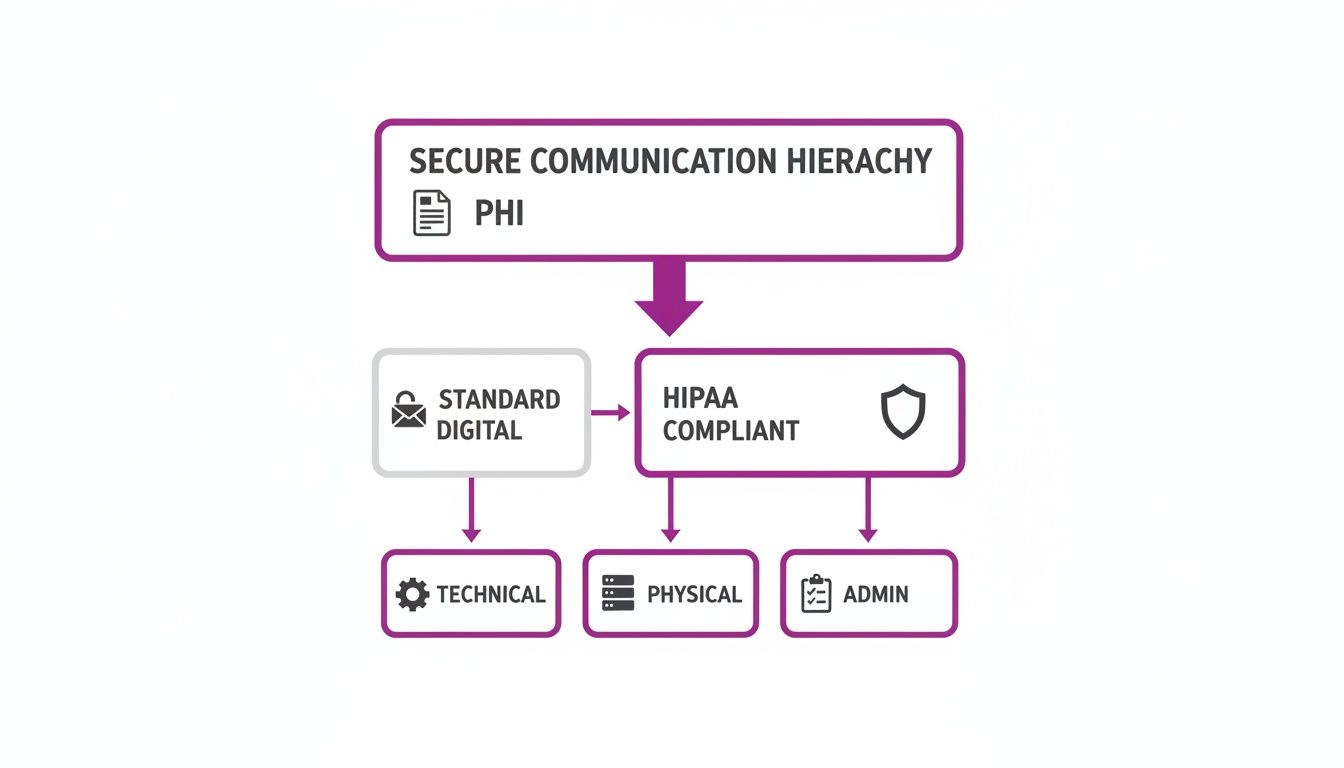
The technology behind a secure online fax service is built on layers of protection. These safeguards—technical, physical, and administrative—all work together to create a secure environment. Technical safeguards include encryption and access controls. Administrative safeguards are the policies and procedures your practice must have in place, from staff training to risk assessments. Finally, physical safeguards apply to the servers where data is stored, protecting them from unauthorized access or environmental threats. Understanding these foundational elements is crucial. Knowing what is a fax number and how it works within a secure digital system is the first step toward modernizing your communications safely.
The Three Pillars of Secure Faxing
When it comes to professional communications, getting security right is non-negotiable. It all boils down to three core principles that form the foundation of any truly secure online faxing service. These three pillars are the Administrative, Physical, and Technical Safeguards required to protect sensitive electronic information. Each one covers a different layer of security, and together they create a powerful defense against data breaches. For any professional practice, making sure your fax vendor masters all three is an absolute must.
First up are the Administrative Safeguards. These aren't about technology; they're about people and policies. This is the rulebook that governs how your team—and your vendors—interact with sensitive client data. A key component here is the Business Associate Agreement (BAA), a legally binding contract your online fax provider must be willing to sign if you operate in a regulated industry like healthcare. This agreement legally obligates them to protect your clients' information with the same level of care you do. This pillar also includes having a security management process, assigning security responsibility to a specific individual, and establishing clear procedures for who can access sensitive information.
Next, we have Physical Safeguards. This is all about protecting the actual, physical hardware where electronic information is stored, from massive servers in a data center to the laptops your staff use daily. The goal is simple: prevent anyone from physically accessing, tampering with, or stealing the equipment.
For an online fax provider, this means their data centers require top-tier security.
| Physical Safeguard Control | What It Really Means |
|---|---|
| Facility Access Controls | Locking down the building so only authorized people can get near the servers. |
| Workstation Use | Clear rules for how to properly use any computer that can access sensitive info. |
| Workstation Security | Physically securing all computers to stop unauthorized users from getting on them. |
| Device & Media Controls | Strict policies for moving any hardware or media (like USB drives) that holds data. |
Finally, we get to the Technical Safeguards. These are the digital locks, alarms, and cameras of your security system. The most important technical safeguard is encryption. Encryption works by scrambling your data into an unreadable code that only someone with the right "key" can unlock. This protection is critical for data in transit (as it travels across the internet) and data at rest (while it’s sitting on a server). Other vital technical safeguards include access controls to ensure users only see what they are authorized to view, audit controls to log all activity, integrity controls to prevent data tampering, and transmission security to protect data as it is sent over a network. Good document management best practices are also key.
How to Vet an Online Fax Vendor
Picking the right online fax service is more than just an IT decision; it's a critical move to protect sensitive information and uphold your organization's integrity. With so many vendors claiming they're "secure," you need a clear-headed way to cut through the marketing fluff. The right partner won't just protect data—they'll shield your practice from significant liability.
This process boils down to asking sharp questions that demand more than a simple "yes" or "no." You need to dig into the specific technical and administrative controls they have in place. Think of it like a background check; you're demanding concrete proof of their security posture.
For organizations in regulated fields, the very first question for any potential online fax vendor should be: "Will you sign a Business Associate Agreement (BAA)?" If their answer is anything other than an immediate "yes," you should walk away. A BAA is a legally binding contract that makes the vendor directly accountable for protecting information according to strict rules.
Once you've cleared that hurdle, it's time to get technical. The next thing to examine is their approach to encryption. Real security demands a two-pronged defense. You need to verify they use strong encryption protocols, like AES 256-bit encryption, for data both "in transit" and "at rest." A good way to verify this is to review their SOC 2 reports. Learning how to read and interpret a SOC 2 report example is a powerful skill.
A secure system isn't just about locking data away; it's also about controlling who can access it and tracking their moves. Your evaluation should zoom in on access controls and audit trails. Ask potential vendors about their access controls, such as permission levels and two-factor authentication (2FA). Just as important are their audit trails. A compliant service must provide detailed logs that track every action related to a fax. For a side-by-side look at how different providers stack up, check out our detailed online fax service comparison.
Vendor Security Checklist
This simple checklist outlines the core features and policies you need to verify when evaluating any secure online fax service.
| Security Feature | What to Ask the Vendor | Why It's Critical |
|---|---|---|
| Business Associate Agreement | "Do you sign a BAA for clients who require it?" | This is a legal requirement in many regulated industries. |
| End-to-End Encryption | "What encryption standards do you use for data in transit and at rest?" | Protects information from interception and ensures data on servers remains unreadable if breached. |
| Access Controls | "How granular are your user permission settings? Do you support 2FA?" | Prevents unauthorized employees from accessing sensitive data and secures accounts. |
| Audit Trails | "Can we access detailed, immutable logs of all fax activity?" | Provides an essential record for accountability and security incident investigations. |
| Data Retention & Deletion | "What is your policy for data retention and secure deletion of faxes?" | Ensures sensitive data is not stored longer than necessary, minimizing exposure risk. |
By following this structured approach, you can move past marketing claims and choose an online fax service that genuinely puts the security and confidentiality of information first. This diligence protects not just your clients, but the long-term health of your practice.
Related Articles
- Fax Machine Security: Key Risks and Best Practices
- The Ultimate Online Fax Service Comparison
- HIPAA Compliant Online Fax: What You Need to Know
- What Is a Fax Number and How Does It Work?
Frequently Asked Questions
1. How does encryption protect my faxes? Encryption essentially scrambles your document into a complex, unreadable code before it’s sent. Only the intended recipient's system has the "key" to unlock and read it. This means that even if someone managed to intercept your data while it's in transit, it would be complete gibberish to them.
2. What is an audit trail and why is it important? An audit trail is a detailed, chronological record of everything that happens with your faxes. It logs who sent what, when it was sent, and whether it was delivered successfully. It's critical for accountability, troubleshooting any issues, and proving you've done your due diligence in protecting sensitive information.
3. Why is automatic document deletion a key security feature? By permanently deleting documents from servers after a short period (like our 24-hour window), the risk of that data being exposed in a future breach is massively reduced. It ensures sensitive information isn't just sitting around indefinitely, which is a core principle of good data hygiene known as "data minimization."
4. How do I know my fax was delivered successfully? FaxZen gives you real-time status updates and sends an immediate email confirmation right when your fax is delivered. This confirmation acts as your digital receipt and proof that your document reached its destination securely.
5. Are payments for the service secure? Absolutely. All our payments are processed through Stripe, a global leader in secure online payment processing. This keeps your financial information handled with the highest level of security and encryption, completely separate from the faxing platform itself.


